







[vc_row font_color=”#ffffff” css=”.vc_custom_1464346792724{padding-top: 17% !important;padding-right: 10% !important;padding-bottom: 17% !important;padding-left: 10% !important;background-image: url(https://abz.photowhoa.com/wp-content/uploads/2016/05/dodge-and-burn.jpg?id=356350) !important;background-position: center !important;background-repeat: no-repeat !important;background-size: cover !important;}” background_style=”parallax”][vc_column font_color=”#ffffff” css=”.vc_custom_1414497512096{padding-right: 0px !important;padding-left: 0px !important;}”][vc_row_inner][vc_column_inner][vc_column_text css=”.vc_custom_1464251985997{margin-bottom: 0px !important;}”]
Dodging & burning magnifies depth — enriches tone, refines blemishes
Is it time you start exploring its secret potential?
[/vc_column_text][/vc_column_inner][/vc_row_inner][/vc_column][/vc_row][vc_row font_color=”#000000″ columns_height=”adjust_cols_height” css=”.vc_custom_1440461576782{background-position: center !important;background-repeat: no-repeat !important;background-size: cover !important;}” background_style=”normal”][vc_column width=”1/2″ css=”.vc_custom_1440461247801{padding-top: 10% !important;}”][vc_column_text css=”.vc_custom_1464256663810{margin-top: -30px !important;margin-bottom: 0px !important;padding-top: 10% !important;padding-right: 10% !important;padding-bottom: 10% !important;padding-left: 10% !important;}”]
With this 3.5 hour video course, you’ll learn the full scope of dodging & burning
Okay, yes, dodging & burning is a really old technique. I get it. If your grandpa had shot film back in the day, he probably used it more than you ever have. So what makes it so special? How can a technique old as your grandpa actually help you in the digital age?
To put bluntly, it’s one of retouching’s most powerful and versatile techniques — known for its precision and power. But you’ve probably ignored because you’ve found it difficult to master or been using it in the wrong way.
It’s very easy to damage color, saturation, or even dull how realistic your images seem if you don’t study it. You can’t just grab the dodge & burn tool and scrub away. So what is the most productive way of using dodge & burn techniques?
After thinking about that question for a bit, I wanted to find a video course that could explain the process from beginning to end and also seize your attention with its amazing scope of education. I also wanted it to stay accessible and easy to follow. It had to have the smarts and the looks.[/vc_column_text][/vc_column][vc_column width=”1/2″ css=”.vc_custom_1464257973856{padding-top: 50% !important;padding-right: 0px !important;padding-left: 0px !important;background-image: url(https://abz.photowhoa.com/wp-content/uploads/2016/05/DB_retouching_course_Amber-Portrait-1_web-1024×1367.jpg?id=356159) !important;background-position: center !important;background-repeat: no-repeat !important;background-size: cover !important;}”][vc_column_text]
[/vc_column_text][/vc_column][/vc_row][vc_row font_color=”#000000″ columns_height=”adjust_cols_height” css=”.vc_custom_1440461576782{background-position: center !important;background-repeat: no-repeat !important;background-size: cover !important;}” background_style=”normal”][vc_column width=”1/2″ css=”.vc_custom_1464755087387{padding-top: 80% !important;padding-right: 0px !important;padding-left: 0px !important;background-image: url(https://abz.photowhoa.com/wp-content/uploads/2016/05/DB_retouching_course_Bree-Beauty-Crop_web-1024×1367.jpg?id=356164) !important;background-position: center !important;background-repeat: no-repeat !important;background-size: cover !important;}”][/vc_column][vc_column width=”1/2″ css=”.vc_custom_1440461247801{padding-top: 10% !important;}”][vc_column_text css=”.vc_custom_1465533912095{margin-top: -30px !important;margin-bottom: 0px !important;padding-top: 10% !important;padding-right: 10% !important;padding-bottom: 10% !important;padding-left: 10% !important;}”]
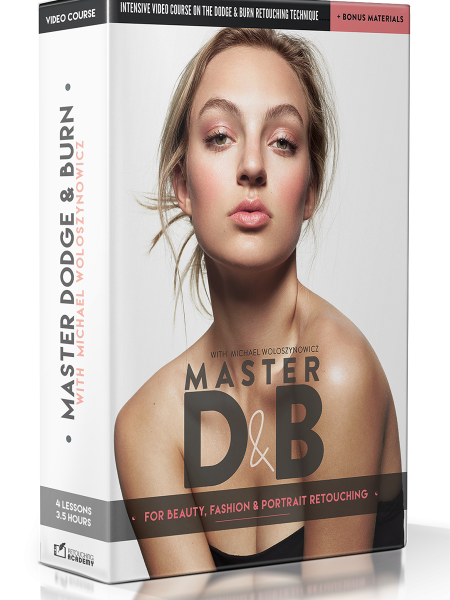
Luckily, Retouching Academy’s Master Dodge & Burn fit the bill exactly.
Michael Woloszynowicz is the instructor of this course. Go ahead and read more about this videos on retouching. I’m sure you’ll find him just as impressive as I do.
In 4 lessons, you’ll learn the complete ins and outs of dodging & burning. You’ll learn how to take advantage of the technique to overcome everything from nitpicky issues of make-up to full-blown mistakes like over- or underexposing your subject.
It’s a deep dive into the nitty-gritty, the fullest breakdown of dodging & burning we’ve ever seen. And right you’re going to get it for $97. But that won’t last for a long time, so hurry and buy it now![/vc_column_text][/vc_column][/vc_row][vc_row font_color=”#000000″ css=”.vc_custom_1473939389829{padding-top: 5% !important;padding-right: 5% !important;padding-bottom: 5% !important;padding-left: 5% !important;background-color: #e2e2e2 !important;}”][vc_column][vc_column_text]
Manipulate luminosity to add dimension, refine skin, and make images pop
[/vc_column_text][vc_column_text]It wouldn’t be full break down if it didn’t cover everything. So what exactly will be covered? First, here are a few problems that you’ll be able to fix after watching it:
- Retouch skin without creating an image that looks unnatural
- Focus attention on your subject by adjusting its luminosity
- Create depth and textural definition by contouring shadows
Now on to the 4 lessons. Spread out through 3.5 hours, each lesson tackles a different aspect of dodging & burning. [/vc_column_text][vc_row_inner css=”.vc_custom_1464333368595{border-bottom-width: 5% !important;padding-top: 5% !important;}”][vc_column_inner][vc_column_text]
Have a look of the eCourse
[/vc_column_text][vc_video link=”https://youtu.be/xEp4qhJEHoY”][/vc_column_inner][/vc_row_inner][/vc_column][/vc_row][vc_row font_color=”#000000″ columns_height=”adjust_cols_height” css=”.vc_custom_1464764653408{padding-bottom: 5% !important;background-position: center !important;background-repeat: no-repeat !important;background-size: cover !important;}” background_style=”normal”][vc_column width=”1/2″ css=”.vc_custom_1464764491021{padding-right: 0px !important;padding-left: 0px !important;background-position: center !important;background-repeat: no-repeat !important;background-size: cover !important;}”][vc_column_text css=”.vc_custom_1473927438213{margin-bottom: 0px !important;padding-top: 5% !important;padding-right: 10% !important;padding-left: 10% !important;}”]
Lesson 1: Concept, Types & Setup
In this 40+ minute lesson, you’ll learn the underlying theory behind dodging & burning, begin to understand what it is and how it works, and figure out why it’s crucial to retouching. You’ll also see how it compares to other retouching techniques out there such as high-frequency separation.[/vc_column_text][/vc_column][vc_column width=”1/2″][vc_column_text css=”.vc_custom_1473927378960{margin-bottom: 0px !important;padding-top: 5% !important;padding-right: 10% !important;padding-left: 10% !important;}”]
Lesson 2: Corrective Dodge & Burn
In this 40+ minute lesson, you’ll learn how to retouch skin and iron out fabrics using a localized approach to dodging & burning. You’ll also learn how to avoid common pitfalls that lead to unnatural results as well as delve into applying curves adjustment layers to begin this approach.[/vc_column_text][/vc_column][/vc_row][vc_row font_color=”#000000″ columns_height=”adjust_cols_height” css=”.vc_custom_1440461576782{background-position: center !important;background-repeat: no-repeat !important;background-size: cover !important;}” background_style=”normal”][vc_column width=”1/2″ css=”.vc_custom_1473927732487{background-position: center !important;background-repeat: no-repeat !important;background-size: cover !important;}”][vc_single_image image=”377824″][/vc_column][vc_column width=”1/2″ css=”.vc_custom_1473927905615{padding-right: 0px !important;padding-left: 0px !important;background-position: center !important;background-repeat: no-repeat !important;background-size: cover !important;}”][vc_column_text css=”.vc_custom_1473927808596{margin-bottom: 0px !important;padding-top: 10% !important;padding-right: 10% !important;padding-bottom: 10% !important;padding-left: 10% !important;}”]
Lesson 3: Global Dodge & Burning — Contouring
In this 44-minute lesson, you’ll learn how to add dimension to the face and body of your subject by using global dodge and burns to create a fuller and more naturally looking presence. These global adjustments, as known as contouring, define shape by using shadow to cast edges.[/vc_column_text][vc_column_text]
[/vc_column_text][/vc_column][/vc_row][vc_row font_color=”#000000″ columns_height=”adjust_cols_height” css=”.vc_custom_1440461576782{background-position: center !important;background-repeat: no-repeat !important;background-size: cover !important;}” background_style=”normal”][vc_column width=”1/2″ css=”.vc_custom_1473939279038{padding-top: 5% !important;}”][vc_column_text css=”.vc_custom_1473939193180{margin-bottom: 0px !important;padding-top: 20% !important;padding-right: 10% !important;padding-bottom: 5% !important;padding-left: 15% !important;}”]
Lesson 4: Color Corrections & Finishing Touches
In this 50+ minute lesson, you’ll learn how to polish up your final image by correcting color and fixing detailed problem areas such as peach fuzz on the cheeks or dark spots in the whites of the eye. You’ll learn all the most useful tools to correcting them.
If you’re ready to learn one of the most powerful and underappreciated tools in retouching, then this course will be your elixir. Think of it as the final step of controlling light. Without it, you’ll always be retouching in the dark.[/vc_column_text][/vc_column][vc_column width=”1/2″ css=”.vc_custom_1473928138688{padding-right: 0px !important;padding-left: 0px !important;background-position: center !important;background-repeat: no-repeat !important;background-size: cover !important;}”][vc_single_image image=”377827″][/vc_column][/vc_row][vc_row font_color=”#ffffff” css=”.vc_custom_1473939257542{padding-right: 5% !important;padding-bottom: 5% !important;padding-left: 5% !important;background-color: #020202 !important;background-position: center !important;background-repeat: no-repeat !important;background-size: cover !important;}” background_style=”normal”][vc_column css=”.vc_custom_1440461247801{padding-top: 10% !important;}”][vc_column_text css=”.vc_custom_1464254900326{margin-bottom: 0px !important;padding-top: 0% !important;padding-right: 10% !important;padding-bottom: 5% !important;padding-left: 10% !important;}”]
What’s all included, again?
[/vc_column_text][vc_column_text css=”.vc_custom_1464257559512{padding-left: 25% !important;}”]
- 4 lessons, totaling 3.5 hours, on mastering dodging & burning
- 2 practice .psds, 1 action pack & 1 custom brush set
- 14-page ebook that guides you through the video course
[/vc_column_text][/vc_column][/vc_row][vc_row font_color=”” css=”.vc_custom_1440465985813{padding-top: 10% !important;padding-bottom: 10% !important;background-color: #f7f7f9 !important;}”][vc_column][vc_column_text css=”.vc_custom_1464257671379{padding-right: 5% !important;padding-left: 5% !important;}”]
Have you been using dodging & burning incorrectly?
Every good retoucher has mastered dodging & burning. Are you ready to learn this essential tool?
[/vc_column_text][vc_column_text][add_to_cart_or_expire_btn][/vc_column_text][/vc_column][/vc_row]

Kenneth Kisbye –
Top quality for experienced and pro users
// Kenneth – photographer