







[vc_row font_color=”#000000″ css=”.vc_custom_1551070434513{padding-top: 25% !important;padding-right: 3% !important;padding-bottom: 25% !important;padding-left: 3% !important;background-image: url(https://abz.photowhoa.com/wp-content/uploads/2019/02/1024-500.jpg?id=547772) !important;background-position: center !important;background-repeat: no-repeat !important;background-size: cover !important;}”][vc_column][/vc_column][/vc_row][vc_row font_color=”#000000″ css=”.vc_custom_1551070138200{padding-top: 3% !important;padding-right: 5% !important;padding-bottom: 3% !important;padding-left: 5% !important;}”][vc_column][vc_column_text]Whether you’re an amateur or a professional, organizing your photos can quickly begin to feel like a full-time job.
It seems like you are constantly moving your photos around to different folders on various devices and within different programs.
But the right photo management software can make a huge difference.
The Movavi Photo Organizer is a new photography tool that just came on the scene. This unique photo management software allows you to easily organize and edit massive amounts of photos in a variety of formats.
So if you love your photos but don’t love the way your time gets sucked away in organizing them, we may at last have the solution.[/vc_column_text][/vc_column][/vc_row][vc_row font_color=”#000000″ css=”.vc_custom_1551072394519{padding-top: 3% !important;padding-right: 3% !important;padding-bottom: 3% !important;padding-left: 3% !important;}”][vc_column][vc_column_text]
Watch How Movavi Photo Manager Works
[/vc_column_text][/vc_column][/vc_row][vc_row font_color=”#000000″ css=”.vc_custom_1551072206035{padding-top: 3% !important;padding-right: 5% !important;padding-bottom: 3% !important;padding-left: 5% !important;background-color: #000000 !important;}”][vc_column][vc_column_text]
Organize Photos
As you take your photos, Movavi Photo Manager will automatically group them based on date and GPS coordinates. So if you want to have an album for a specific event or occasion, it’s already right there.
In addition, just click on the “Places” tab to open up all your photos that were grouped in one particular city or country.
To add another level of organization, you can also tag photos based on topics that you create (i.e., travel, hobbies, family, etc.).
This makes it easy for you to navigate to the photos that you want. Even if you hardly have time to set up any folders or tags for your photos, Movavi’s intuitive automatic organization makes it easy. All you have to do is click on their desktop photo app to get started.[/vc_column_text][/vc_column][/vc_row][vc_row font_color=”#000000″ css=”.vc_custom_1551077882917{padding-bottom: 3% !important;background-color: #000000 !important;}”][vc_column][vc_column_text]
Automatic Album Creation
Movavi’s photo organizer will automatically sort your images by date and GPS coordinates.
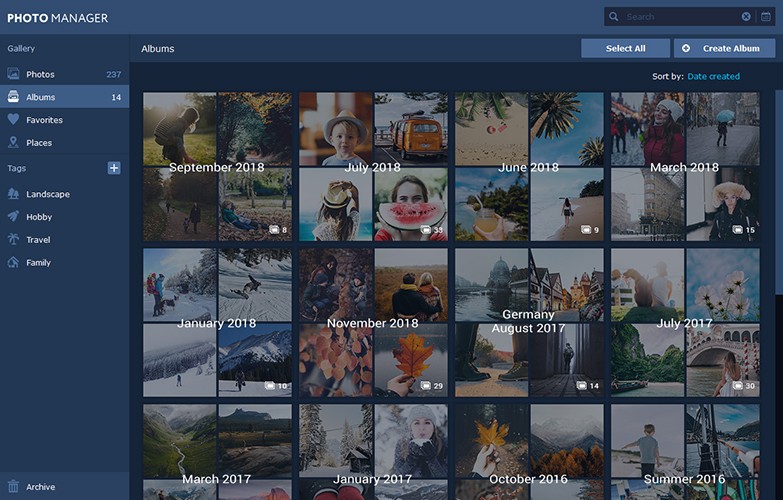
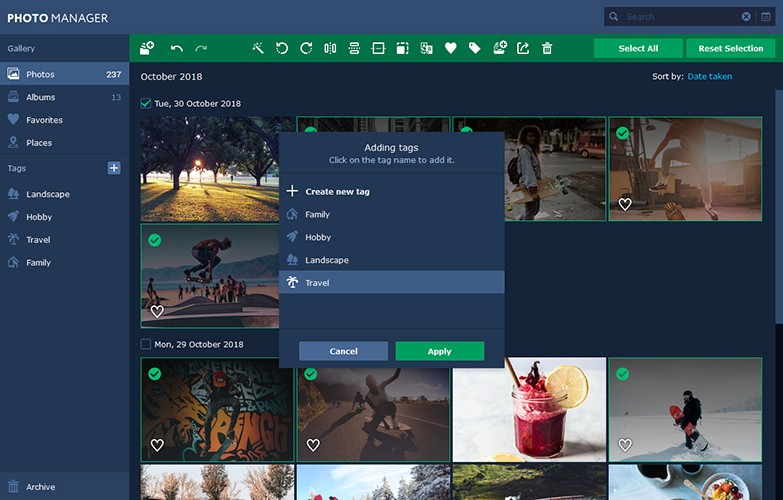
Photo Tagging
Add tags to image files using Movavi’s picture organizer so you can easily navigate around your photo library.
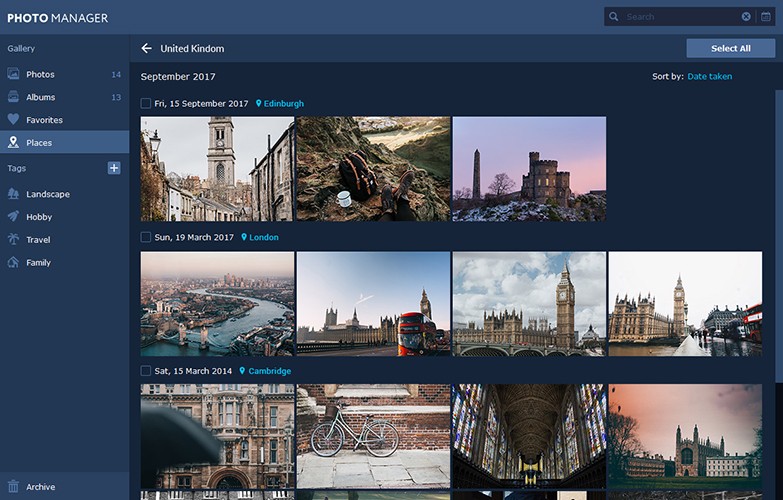
Geolocation
Review the automatically created photo albums sorted by country — filter images in these albums by a city.
 [/vc_column_text][/vc_column][/vc_row][vc_row font_color=”#000000″ css=”.vc_custom_1551073911747{padding-top: 3% !important;padding-right: 3% !important;padding-bottom: 3% !important;padding-left: 3% !important;}”][vc_column][vc_column_text]
Editing
This software gives you the ability to crop, flip and rotate photos all at once or individually.
All you have to do is select as many photos as you want to edit and then apply the desired change.
Other features are also available, including image resizing and straightening horizons.
Movavi gives you the ability to open up and view photos quickly and easily, no matter what format they’re in.
This photo management software is compatible with images in RAW, JPEG, and PNG formats, just to name a few.
[/vc_column_text][vc_single_image image=”547783″ alignment=”center”][/vc_column][/vc_row][vc_row font_color=”#000000″ css=”.vc_custom_1551077317600{padding-top: 3% !important;padding-right: 5% !important;padding-bottom: 2% !important;padding-left: 5% !important;background-color: #000000 !important;}”][vc_column][vc_column_text]
Simplify Your Life
This photo management software makes all kinds of life hacks possible.
For one thing, you now have the freedom to relax and enjoy your next family vacation instead of spending the whole time fussing with your photos. And still, your memories of this wonderful time will remain intact and easily accessible long after the vacation is over.
Here are some occasions in which this photo management software can be a real lifesaver.
[/vc_column_text][/vc_column][/vc_row][vc_row font_color=”#000000″ css=”.vc_custom_1551077349237{padding-right: 3% !important;padding-bottom: 2% !important;padding-left: 3% !important;background-color: #000000 !important;}”][vc_column width=”1/2″][vc_column_text]
Traveling
If you travel often, you probably know the despair of coming home from a long trip, looking through your pictures…and having no memory of where some of them were taken.
To avoid this problem, you might spend some time while you’re in your hotel room at night to sort your photos into folders, neatly labeled with the names of various cities and attractions.
However, there are certainly better things that you can do with your time while experiencing a travel adventure.
You can trust the Movavi photo management software to make all the necessary changes for you as you go. So all you need to do is focus on having a great time.[/vc_column_text][/vc_column][vc_column width=”1/2″ css=”.vc_custom_1551075914774{padding-top: 5% !important;}”][vc_single_image image=”547784″ alignment=”center”][/vc_column][/vc_row][vc_row font_color=”#000000″ css=”.vc_custom_1551077521302{padding-right: 3% !important;padding-bottom: 2% !important;padding-left: 3% !important;background-color: #000000 !important;}”][vc_column width=”1/2″][vc_column_text]
Get-togethers with family and friends
Having a birthday party for one of your children? Just tap on the pictures of the event to group them all together for easy access.
And you can even create a larger topic to allow you to view all the photos of the same child’s birthday over the years. No more searching for them.[/vc_column_text][/vc_column][vc_column width=”1/2″][vc_single_image image=”547787″ alignment=”center”][/vc_column][/vc_row][vc_row font_color=”#000000″ css=”.vc_custom_1551077535653{padding-right: 3% !important;padding-bottom: 2% !important;padding-left: 3% !important;background-color: #000000 !important;}”][vc_column width=”1/2″][vc_column_text]
Professional Photography
The Movavi photo management software can dramatically speed up your workflow, giving you the ability to quickly accomplish tasks that used to eat up hours of your time.
You can instantly tag photos based on client, model or subject. No more searching through endless folders to find something that your client has asked about.
And a simpler workflow means more productivity which, of course, means more profit.[/vc_column_text][/vc_column][vc_column width=”1/2″][vc_single_image image=”547788″ alignment=”center”][/vc_column][/vc_row][vc_row font_color=”#000000″ css=”.vc_custom_1551077289917{padding-top: 3% !important;padding-right: 5% !important;padding-bottom: 3% !important;padding-left: 15% !important;}”][vc_column][vc_column_text]
All the Bells and Whistles
Here are all the features that are included with this revolutionary photo management software.
- Batch Photo Editing: You can edit multiple photos all at the same time using the following effects
- Auto Horizon leveling
- Rotation and Cropping
- Flipping Horizontally or Vertically
- Auto Enhancement to adjust Saturation, Brightness,and Contrast
Resizing
- Download Complete Albums
- Export to all popular formats, including JPEG, PIC, PNG, PIX, RAW
- Batch Photo Renaming
- Editing in Viewing Mode
- Automatic Album Creation
- Geolocation
- Photo Tagging
[/vc_column_text][/vc_column][/vc_row][vc_row][vc_column][vc_column_text]
System Requirements
[/vc_column_text][/vc_column][/vc_row][vc_row font_color=”#000000″ css=”.vc_custom_1551077080419{padding-top: 2% !important;padding-right: 5% !important;padding-bottom: 3% !important;padding-left: 5% !important;}”][vc_column width=”1/2″][vc_column_text]
Windows
- Microsoft registered
- Intel:registered:, AMD:registered:, or compatible dual-core processor, 1.5 GHz
- Graphics card: Intel:registered: HD Graphics 2000, NVIDIA:registered: GeForce:registered: series 8 and 8M, Quadro FX 4800, Quadro FX 5600, AMD Radeon:tm: R600, Mobility Radeon:tm: HD 4330, Mobility FirePro:tm: series, Radeon:tm: R5 M230 or higher graphics card with up-to-date drivers
- 1280 × 768 screen resolution and 32-bit color display
- 2 GB RAM
- 500 MB available hard disk space for installation, 1 GB for ongoing operations
- Administrator permissions are required for installation
[/vc_column_text][/vc_column][vc_column width=”1/2″][vc_column_text]
Mac
- Mac OS X:registered: 10.7 or higher
- 64-bit Intel:registered: processor
- 1280 × 768 screen resolution, 32-bit color display
- 2 GB RAM
- 500 MB available hard disk space for installation, 1 GB for ongoing operations
- Administrator permissions are required for installation
[/vc_column_text][/vc_column][/vc_row][vc_row font_color=”#000000″ css=”.vc_custom_1551077147182{padding-top: 3% !important;padding-right: 5% !important;padding-bottom: 3% !important;padding-left: 5% !important;}”][vc_column][vc_column_text]
Download this game-changing photo management software today.
[/vc_column_text][/vc_column][/vc_row][vc_row][vc_column]
[/vc_column][/vc_row]

Adrian –
Such a simple piece of software to use and with great results and at a bargain price get in
William Gregory –
Excellent.
Simple to use.
Found photos I had forgotten.
William Gregory –
Excellent. Easy and quick management of all my photos. I am amazed how simple it is to achieve an overview of even long forgotten photos. Thanks!