







[vc_row font_color=”#000000″ columns_height=”adjust_cols_height” css=”.vc_custom_1440461576782{background-position: center !important;background-repeat: no-repeat !important;background-size: cover !important;}” background_style=”normal”][vc_column css=”.vc_custom_1449812363929{padding-top: 0% !important;padding-right: 15% !important;padding-left: 15% !important;}”][vc_column_text css=”.vc_custom_1450246473470{margin-top: -25px !important;margin-bottom: 0px !important;padding-top: 10% !important;padding-right: 10% !important;padding-bottom: 10% !important;padding-left: 10% !important;}”]
One day I looked for a set of photos that I really wanted to re-edit…
Not on my harddrive. Strange.
Not on my external disk. Uh oh…
Crap! I just remembered. I deleted it without making a backup.
How many of you have ever felt the heart-wrenching feeling that you’ve just deleted some important photos?
After that fateful night, I went to sleep not realizing that I could have potentially saved some of the important files on that disk that I deleted.
Enter Photo Recovery.
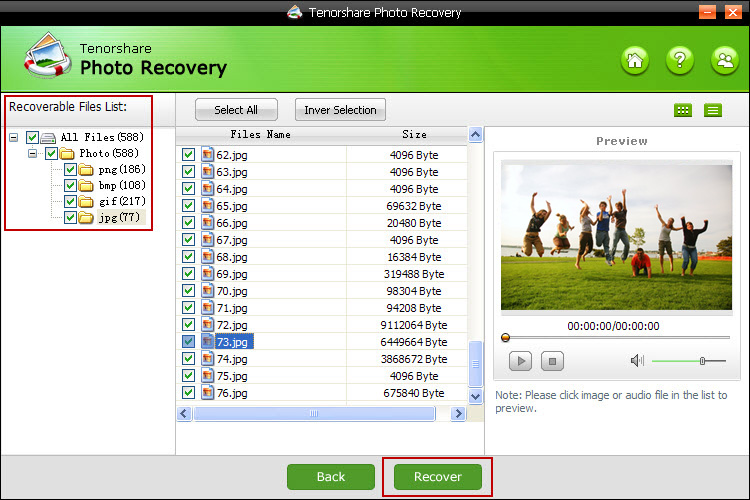
This is a software designed to help you recover some of your lost files.
Tenorshare’s Photo Recovery is the powerful data recovery software. It is simple and has flexible recovery options that can help you get your deleted photos, music and videos back within minutes.
Recover files from:
- Altered partitions
- Reformatted disks
- Mobile phone
- Memory card
- Camera cards
- External hard drive
- USB, pen drive, etc.
You can restore files that have been lost in a variety of ways – such as accidental deletions, partition changes, viruses and formatted partitions.
Here’s a video to show you how it works:[/vc_column_text][vc_video link=”https://www.youtube.com/watch?v=UheIMxRe2k8″][/vc_column][/vc_row][vc_row font_color=”#000000″ columns_height=”adjust_cols_height” css=”.vc_custom_1440461576782{background-position: center !important;background-repeat: no-repeat !important;background-size: cover !important;}” background_style=”normal”][vc_column css=”.vc_custom_1450246519823{padding-top: 0% !important;padding-right: 15% !important;padding-left: 15% !important;}”][vc_column_text css=”.vc_custom_1450246488298{margin-top: -70px !important;margin-bottom: 0px !important;padding-top: 10% !important;padding-right: 10% !important;padding-bottom: 10% !important;padding-left: 10% !important;}”]The actual price of this software is $24.95. But for a limited time you’re getting this Tenorshare’s photo recovery software – FREE
Key Features:
1. Recover deleted files when you inadvertently deleted by commanding “Shift+Delete” or emptying the Recycle Bin
2. Restore files from formatted or reformatted partition or disks
3. Backup, restore or recover partition table
4. Recover photos, music, video and audio files. Nearly 200 file types supported
5. Data restore for hard disk, external hard drive, memory card, memory stick, USB drive, pen drive, zip drive and more
6. Preview lost files before recovery
7. Support FAT12/16/32 and NTFS file system
8. Runs smoothly on Windows 10, 8, 7, Vista, XP, etc. and Windows servers.
Specifications:
- Operating System: Windows 10/Windows 8.1/Windows 8/Windows 7/Vista/Windows XP (64&32 bits)
- CPU: 1GHz (32 bit or 64 bit) and above
- RAM: 1GB or above
- Hard Disk Space: 200MB free space and above
Deal Terms:
- You will receive a download link and license key in a doc file.
- Free support will be provided.
- No updates are included.
- More detailed tech specs
[/vc_column_text][/vc_column][/vc_row][vc_row font_color=”” css=”.vc_custom_1440465985813{padding-top: 10% !important;padding-bottom: 10% !important;background-color: #f7f7f9 !important;}”][vc_column][vc_column_text]
Want to recover some photos?
Get Tenorshare’s software FREE for PhotoWhoa members.
[/vc_column_text][vc_column_text][add_to_cart_or_expire_btn][/vc_column_text][/vc_column][/vc_row]

Ronny Wttesaele –
Norton says that tenorshare is unsafe
Megha Kendre –
Hi Ronny, This is the first :O ..I am going to followup this issue via email. Drop in a mail to [email protected]