







[vc_row font_color=”#000000″ css=”.vc_custom_1527854766227{padding-top: 22% !important;padding-bottom: 22% !important;background-image: url(https://abz.photowhoa.com/wp-content/uploads/2018/05/1920×844-80-Actions.jpeg?id=501223) !important;background-position: center !important;background-repeat: no-repeat !important;background-size: cover !important;}”][vc_column][/vc_column][/vc_row][vc_row font_color=”#000000″ css=”.vc_custom_1527482441492{padding-top: 5% !important;padding-left: 3% !important;}”][vc_column width=”1/2″][vc_column_text css=”.vc_custom_1527482504441{padding-top: 12% !important;padding-right: 3% !important;}”]The right Photoshop actions bundle can transform your photography forever.
But where to find exactly the effects you need?
After plenty of research, you may find a few that you love. But if you use the same actions too often, they may begin to lose their effectiveness.
What you long for, more than anything, is to have an unlimited supply of dramatic Photoshop actions available for your immediate use. That way, as soon as you get tired of one of them, there are plenty of others to choose from.
Unfortunately, the time you spend searching for the perfect set of Photoshop actions is taking your focus away from other necessary tasks in running your photography business. And if you do find a bundle of actions that work, you then have to spend more time installing and learning to use them.
After all that time and effort, you may end up using the same actions just a few times before you get bored with them and are ready to try something else.[/vc_column_text][/vc_column][vc_column width=”1/2″][vc_single_image image=”500729″ alignment=”center”][/vc_column][/vc_row][vc_row font_color=”#000000″ css=”.vc_custom_1527482555798{padding-top: 5% !important;padding-right: 5% !important;padding-left: 5% !important;}”][vc_column][vc_column_text]
The Photoshop actions bundle you’ve been waiting for!
[/vc_column_text][/vc_column][/vc_row][vc_row font_color=”#000000″ css=”.vc_custom_1527482704643{padding-top: 3% !important;padding-right: 3% !important;}”][vc_column width=”1/2″][vc_single_image image=”500730″ alignment=”center”][/vc_column][vc_column width=”1/2″][vc_column_text css=”.vc_custom_1527482914954{padding-left: 3% !important;}”]This special collection of Photoshop actions will change your life and career forever.
You now have an unlimited supply of dramatic effects right at your fingertips.
Even better, they are easy to use, simplifying your workflow instead of complicating it.
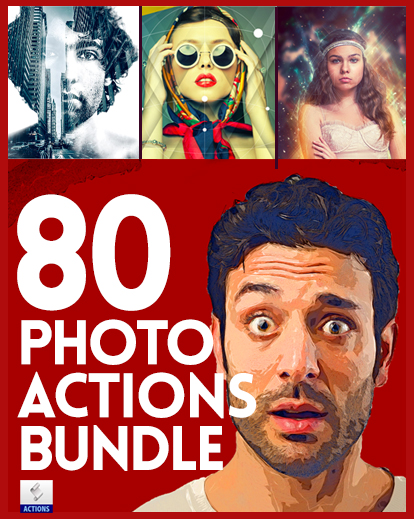
With 80 different collections of original actions, you will never lack for fresh inspiration again.
Not only does this bundle contain every effect you’ve ever wanted, it also offers some effects you haven’t even imagined yet.
Ever wanted to add a unique dreamlike quality to your photos? The Dreamily collection provides endless ideas to achieve that.
Have you ever thought of giving a photo a pointillist effect, transforming into tiny dots? Now you can.
Your photos will immediately stand out from others anywhere they are found, with almost no effort from you.
All you need to do is take the pictures, imagine exactly the effect you want, and then do it.
The only limit is your own creativity.[/vc_column_text][/vc_column][/vc_row][vc_row font_color=”#000000″ css=”.vc_custom_1527483781584{padding-top: 5% !important;padding-right: 5% !important;padding-left: 5% !important;background-color: #000000 !important;}”][vc_column][vc_column_text]
Let’s take a look at a few examples of the actions…
[/vc_column_text][/vc_column][/vc_row][vc_row font_color=”#000000″ css=”.vc_custom_1527483801379{padding-top: 3% !important;background-color: #000000 !important;}”][vc_column][vc_column_text]
Bauhaus Photoshop Action
[/vc_column_text][/vc_column][/vc_row][vc_row font_color=”#000000″ css=”.vc_custom_1527483830103{padding-top: 3% !important;background-color: #000000 !important;}”][vc_column width=”1/2″][vc_column_text]
Before
[/vc_column_text][vc_single_image image=”500735″ alignment=”center”][/vc_column][vc_column width=”1/2″][vc_column_text]
After
[/vc_column_text][vc_single_image image=”500736″ alignment=”center”][/vc_column][/vc_row][vc_row font_color=”#000000″ css=”.vc_custom_1527484245787{padding-top: 4% !important;background-color: #000000 !important;}”][vc_column][vc_column_text]
Summer Painting Photoshop Action
[/vc_column_text][/vc_column][/vc_row][vc_row font_color=”#000000″ css=”.vc_custom_1527483830103{padding-top: 3% !important;background-color: #000000 !important;}”][vc_column width=”1/2″][vc_column_text]
Before
[/vc_column_text][vc_single_image image=”500737″ alignment=”center”][/vc_column][vc_column width=”1/2″][vc_column_text]
After
[/vc_column_text][vc_single_image image=”500738″ alignment=”center”][/vc_column][/vc_row][vc_row font_color=”#000000″ css=”.vc_custom_1527484245787{padding-top: 4% !important;background-color: #000000 !important;}”][vc_column][vc_column_text]
Smoke Photoshop Action
[/vc_column_text][/vc_column][/vc_row][vc_row font_color=”#000000″ css=”.vc_custom_1527483830103{padding-top: 3% !important;background-color: #000000 !important;}”][vc_column width=”1/2″][vc_column_text]
Before
[/vc_column_text][vc_single_image image=”500739″ alignment=”center”][/vc_column][vc_column width=”1/2″][vc_column_text]
After
[/vc_column_text][vc_single_image image=”500740″ alignment=”center”][/vc_column][/vc_row][vc_row font_color=”#000000″ css=”.vc_custom_1527484245787{padding-top: 4% !important;background-color: #000000 !important;}”][vc_column][vc_column_text]
Drawing Photoshop Action
[/vc_column_text][/vc_column][/vc_row][vc_row font_color=”#000000″ css=”.vc_custom_1527483830103{padding-top: 3% !important;background-color: #000000 !important;}”][vc_column width=”1/2″][vc_column_text]
Before
[/vc_column_text][vc_single_image image=”500741″ alignment=”center”][/vc_column][vc_column width=”1/2″][vc_column_text]
After
[/vc_column_text][vc_single_image image=”500742″ alignment=”center”][/vc_column][/vc_row][vc_row font_color=”#000000″ css=”.vc_custom_1527484245787{padding-top: 4% !important;background-color: #000000 !important;}”][vc_column][vc_column_text]
Realistic Painting Photoshop Action
[/vc_column_text][/vc_column][/vc_row][vc_row font_color=”#000000″ css=”.vc_custom_1527483830103{padding-top: 3% !important;background-color: #000000 !important;}”][vc_column width=”1/2″][vc_column_text]
Before
[/vc_column_text][vc_single_image image=”500745″ alignment=”center”][/vc_column][vc_column width=”1/2″][vc_column_text]
After
[/vc_column_text][vc_single_image image=”500746″ alignment=”center”][/vc_column][/vc_row][vc_row font_color=”#000000″ css=”.vc_custom_1527484245787{padding-top: 4% !important;background-color: #000000 !important;}”][vc_column][vc_column_text]
Etching Drawing Photoshop Action
[/vc_column_text][/vc_column][/vc_row][vc_row font_color=”#000000″ css=”.vc_custom_1527483830103{padding-top: 3% !important;background-color: #000000 !important;}”][vc_column width=”1/2″][vc_column_text]
Before
[/vc_column_text][vc_single_image image=”500743″ alignment=”center”][/vc_column][vc_column width=”1/2″][vc_column_text]
After
[/vc_column_text][vc_single_image image=”500744″ alignment=”center”][/vc_column][/vc_row][vc_row font_color=”#000000″ css=”.vc_custom_1527484245787{padding-top: 4% !important;background-color: #000000 !important;}”][vc_column][vc_column_text]
Focal Zoom Photoshop Action
[/vc_column_text][/vc_column][/vc_row][vc_row font_color=”#000000″ css=”.vc_custom_1527483830103{padding-top: 3% !important;background-color: #000000 !important;}”][vc_column width=”1/2″][vc_column_text]
Before
[/vc_column_text][vc_single_image image=”500747″ alignment=”center”][/vc_column][vc_column width=”1/2″][vc_column_text]
After
[/vc_column_text][vc_single_image image=”500748″ alignment=”center”][/vc_column][/vc_row][vc_row font_color=”#000000″ css=”.vc_custom_1527484245787{padding-top: 4% !important;background-color: #000000 !important;}”][vc_column][vc_column_text]
Old Painting Photoshop Action
[/vc_column_text][/vc_column][/vc_row][vc_row font_color=”#000000″ css=”.vc_custom_1527483830103{padding-top: 3% !important;background-color: #000000 !important;}”][vc_column width=”1/2″][vc_column_text]
Before
[/vc_column_text][vc_single_image image=”500749″ alignment=”center”][/vc_column][vc_column width=”1/2″][vc_column_text]
After
[/vc_column_text][vc_single_image image=”500750″ alignment=”center”][/vc_column][/vc_row][vc_row font_color=”#000000″ css=”.vc_custom_1527484245787{padding-top: 4% !important;background-color: #000000 !important;}”][vc_column][vc_column_text]
Sabattier Photoshop Action
[/vc_column_text][/vc_column][/vc_row][vc_row font_color=”#000000″ css=”.vc_custom_1527483830103{padding-top: 3% !important;background-color: #000000 !important;}”][vc_column width=”1/2″][vc_column_text]
Before
[/vc_column_text][vc_single_image image=”500751″ alignment=”center”][/vc_column][vc_column width=”1/2″][vc_column_text]
After
[/vc_column_text][vc_single_image image=”500754″ alignment=”center”][/vc_column][/vc_row][vc_row font_color=”#000000″ css=”.vc_custom_1527484245787{padding-top: 4% !important;background-color: #000000 !important;}”][vc_column][vc_column_text]
Soft Vintage Paint Photoshop Action
[/vc_column_text][/vc_column][/vc_row][vc_row font_color=”#000000″ css=”.vc_custom_1527486746543{padding-top: 3% !important;padding-bottom: 3% !important;background-color: #000000 !important;}”][vc_column width=”1/2″][vc_column_text]
Before
[/vc_column_text][vc_single_image image=”500755″ alignment=”center”][/vc_column][vc_column width=”1/2″][vc_column_text]
After
[/vc_column_text][vc_single_image image=”500756″ alignment=”center”][/vc_column][/vc_row][vc_row font_color=”#000000″ css=”.vc_custom_1527486852304{padding-top: 5% !important;padding-right: 5% !important;padding-left: 5% !important;}”][vc_column][vc_column_text]
Your photography will never be the same!
[/vc_column_text][/vc_column][/vc_row][vc_row font_color=”#000000″ css=”.vc_custom_1527487093444{padding-top: 3% !important;padding-left: 3% !important;}”][vc_column width=”1/2″][vc_column_text css=”.vc_custom_1527490690595{padding-top: 5% !important;padding-right: 3% !important;}”]Imagine just for a moment that your imagination has free rein.
You are not bound by the limits of practicality. You are not confined by time, money, or technical know-how. You can give your images any appearance you desire by a few clicks of a button.
That’s exactly what we’re offering.
Even better, imagine what you can do with the time that you’ll save.
That’s time you can use to interact with clients, brainstorm ideas, and find new avenues to sell your work.
Your photography business will grow by leaps and bounds, propelled by the power of your imagination.
Isn’t this what you’ve always wanted?
You might expect to have to pay top dollar for this amazing product, but we’re offering it at a one-time price of just $19.
That averages out to about one dollar for each amazing collection.
With all that you’ll achieve, we’re pretty sure that you will regain that money back and more after just a few weeks of using this product.[/vc_column_text][/vc_column][vc_column width=”1/2″][vc_single_image image=”500758″ alignment=”center”][/vc_column][/vc_row][vc_row font_color=”#000000″ css=”.vc_custom_1527488165922{padding-top: 5% !important;padding-right: 5% !important;padding-left: 5% !important;background-color: #000000 !important;}”][vc_column][vc_column_text]
One package, 80 stunning collections
[/vc_column_text][/vc_column][/vc_row][vc_row font_color=”#000000″ css=”.vc_custom_1527488187866{padding-top: 3% !important;padding-right: 10% !important;padding-left: 10% !important;background-color: #000000 !important;}”][vc_column][vc_column_text]
Below are the 50 categories in which there are a total of 80 actions available to you in this amazing package:
[/vc_column_text][/vc_column][/vc_row][vc_row font_color=”#000000″ css=”.vc_custom_1527489249406{padding-top: 3% !important;padding-bottom: 3% !important;padding-left: 20% !important;background-color: #000000 !important;}”][vc_column width=”1/2″][vc_column_text]
- 20 Painting Photoshop Actions
- 3D Life
- 20+ selective Area
- Abstract Art
- Abstract Art Action
- Abstract Drawing Action
- Abstract Painting
- Art
- Bauhaus Art photoshop Action
- Bauhaus Photoshop Action V-2
- Bubble Photoshop Action
- Comic
- Cristal Lights
- Double Exposure
- Double Exposure v.2
- Drawing
- Dreamily
- Etching V.2
- Etching Drawing
- Etching V.1
- Focal Zoom
- Ghost
- Glitch
- Glitch V.2
- Hand Drawing
[/vc_column_text][/vc_column][vc_column width=”1/2″][vc_column_text]
- Lights Leaks
- Line Art
- Low Poly
- Low Poly V.2
- Mathic Painting
- Max Painting
- Melodious Painting
- Mono Painting
- Mystic Painting
- Mythical Painting
- Neon Portraits Actions
- Old Painting
- Old Painting Effect
- Old Way Pinting effect
- Poster Art
- Rainy day Action
- Realistic Painting Action
- Realistic Painting v.2
- Retro Comic
- Sabattier Effect
- Sand Storm
- Smoke Effect
- Soft Vintage Paint
- Summer Painting
- Upwise Print Effect
[/vc_column_text][/vc_column][/vc_row][vc_row font_color=”#000000″ css=”.vc_custom_1527489720313{padding-top: 5% !important;padding-right: 5% !important;padding-left: 5% !important;}”][vc_column][vc_column_text]
How to install the actions
[/vc_column_text][/vc_column][/vc_row][vc_row font_color=”#000000″ css=”.vc_custom_1527489728656{padding-top: 3% !important;padding-bottom: 3% !important;padding-left: 15% !important;}”][vc_column][vc_column_text]1. Inside Photoshop, go to the ‘Window’ menu and select ‘Actions’. A window
will now appear on the right-hand side.
2. Inside the Actions window, click on the top right-hand corner icon to reveal
the drop-down menu. From here select ‘Load Actions…’. Select the action which came with the download.
3. The action will now appear in the actions panel.[/vc_column_text][/vc_column][/vc_row][vc_row font_color=”#000000″ css=”.vc_custom_1527489533408{padding-top: 5% !important;padding-right: 5% !important;padding-left: 5% !important;background-color: #eaeaea !important;}”][vc_column][vc_column_text]
The Ultimate Photoshop Actions Bundle Is Waiting For You Right Here, Right Now!
**Download Today**
[/vc_column_text]
[/vc_column][/vc_row]

Reviews
There are no reviews yet.