







[vc_row font_color=”#000000″ css=”.vc_custom_1507114071110{padding-top: 14% !important;padding-right: 10% !important;padding-bottom: 14% !important;padding-left: 10% !important;background-image: url(https://abz.photowhoa.com/wp-content/uploads/2017/05/pic.jpeg?id=424297) !important;background-position: center !important;background-repeat: no-repeat !important;background-size: cover !important;}”][vc_column][vc_column_text]
The Photoshop Color Lookup Package will add gorgeous looks to your photography.
[/vc_column_text][/vc_column][/vc_row][vc_row font_color=”#000000″ css=”.vc_custom_1493876329043{padding-top: 5% !important;padding-right: 10% !important;padding-left: 10% !important;}”][vc_column][vc_column_text]
What Can You Do With These 148 Color Looks?
[/vc_column_text][/vc_column][/vc_row][vc_row][vc_column][vc_column_text]
[/vc_column_text][/vc_column][/vc_row][vc_row font_color=”#000000″ css=”.vc_custom_1493876307451{padding-top: 5% !important;padding-right: 10% !important;padding-bottom: 3% !important;padding-left: 10% !important;}”][vc_column width=”1/2″][vc_column_text]These Photoshop color lookups are special packages of Presets that are designed to work with Photoshop’s new Color Lookup Adjustment feature. This feature will allow you to instantly change the overall appearance of a photo – just by choosing a new “look” from the presets.
These presets are called lookup tables lookup tables, or LUTs, and they contain instructions for Photoshop to take the original colors in your image and change them to different colors in order to create a certain overall tone or appearance.
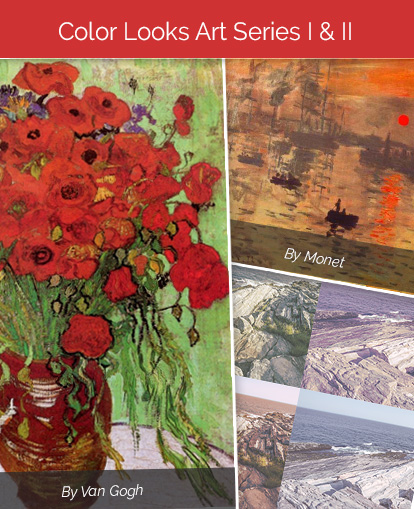
It might sound a little complicated, but they are incredibly easy to use. They can be used to add a dramatically different appearance to your digital photos with just one click.[/vc_column_text][/vc_column][vc_column width=”1/2″][vc_single_image image=”425807″ alignment=”center” css=”.vc_custom_1585740990117{padding-top: 1% !important;padding-right: 1% !important;padding-bottom: 1% !important;padding-left: 1% !important;}”][/vc_column][/vc_row][vc_row font_color=”#000000″ css=”.vc_custom_1493961696808{padding-top: 3% !important;padding-right: 10% !important;padding-bottom: 3% !important;padding-left: 10% !important;}”][vc_column width=”1/2″][vc_single_image image=”425809″ alignment=”center” css=”.vc_custom_1585741209270{padding-top: 1% !important;padding-right: 1% !important;padding-bottom: 1% !important;padding-left: 1% !important;}”][/vc_column][vc_column width=”1/2″][vc_column_text]These 148 Photoshop color lookups in the Art Series I & II are inspired by the paintings of two of the art world’s greatest masters – Monet and Van Gogh. Their iconic paintings are considered some of the most valuable artworks in the world and now you can style your photographs with the same palette of hues they use.
It is important to note that these are not filters that change photographs into paintings. The looks map their colors based on the color themes of Van Gogh’s or Monet’s paintings and apply these color filters to your photos.
They can give a subtly different tone to a photo, such as making it look warmer or cooler. Or, they can give a completely different look to a photo – creating a dramatic and artistic visual style.[/vc_column_text][/vc_column][/vc_row][vc_row font_color=”#000000″ css=”.vc_custom_1493969048721{padding-right: 10% !important;padding-bottom: 2% !important;padding-left: 10% !important;}”][vc_column width=”1/2″][vc_single_image image=”425815″ alignment=”center” css=”.vc_custom_1585741303445{padding-top: 1% !important;padding-right: 1% !important;padding-bottom: 1% !important;padding-left: 1% !important;}”][/vc_column][vc_column width=”1/2″][vc_single_image image=”425813″ alignment=”center” css=”.vc_custom_1585741342770{padding-top: 1% !important;padding-right: 1% !important;padding-bottom: 1% !important;padding-left: 1% !important;}”][/vc_column][/vc_row][vc_row font_color=”#000000″ css=”.vc_custom_1494303564962{padding-top: 3% !important;padding-right: 10% !important;padding-left: 10% !important;}”][vc_column][vc_single_image image=”425811″ alignment=”center” css=”.vc_custom_1585741382658{padding-top: 1% !important;padding-right: 1% !important;padding-bottom: 1% !important;padding-left: 1% !important;}”][/vc_column][/vc_row][vc_row font_color=”#000000″ css=”.vc_custom_1493963336395{padding-top: 2% !important;padding-right: 10% !important;padding-bottom: 3% !important;padding-left: 10% !important;}”][vc_column][vc_column_text css=”.vc_custom_1493878284233{padding-top: 5% !important;}”]
The Van Gogh Color Look
Van Gogh’s approach to color was a significant contribution to painting and it changed the direction of art. His color palette is characterized by strong primary colors such as blues, yellows, and reds.
He mixed his colors with painters gray that he made from white, Vandyk brown, red and blue. He also used powerful hues such as cadmium yellow, red lake, Prussian blue, and ultramarine. He was influenced by prints from Japan and he painted dark outlines around objects – filling them with thick blocks of color. He also used complementary colors to make each hue he used seem brighter.
When you apply these 74 Color Looks, they will alter the colors in your images, basing them on the palette of the Van Gogh theme you choose.[/vc_column_text][vc_column_text css=”.vc_custom_1494926340151{padding-top: 5% !important;}”]
The Monet Color Look
This package of 74 color looks is inspired by the subtle and elegant palette of Monet’s paintings. Monet used a lot of bright vibrant shades and cool pastels to create his signature Impressionism works of art – including chrome yellow, viridian green, French ultramarine, cobalt blue and titanium white. He rarely used black – even in the shadows – instead he created the appearance of black by blending greens, reds and blues. In his famous paintings of water lilies, morning fog and haystacks he used a lot of magentas, purples, teals and peach tones.
The Monet Color look Looks can add drama and a perfect finishing touch to your photography project. The best strategy is to experiment with it them and be playful to see how these colors and tones can change the look of your project.
Compatibility
Software compatibility: The Art Series Color Looks are compatible with Adobe Photoshop versions CS6 and later (including Photoshop CS6, CC, CC 2014, CC 2015, CC 2015.5, CC 2017 and later).
These Color Looks are not compatible with Photoshop Elements, nor with Photoshop CS5 or earlier, because those versions do not have the Color Lookup adjustment feature.[/vc_column_text][/vc_column][/vc_row][vc_row][vc_column][vc_column_text]
[/vc_column_text][/vc_column][/vc_row][vc_row font_color=”#000000″ css=”.vc_custom_1493878065279{padding-top: 5% !important;padding-right: 10% !important;padding-bottom: 3% !important;padding-left: 10% !important;}”][vc_column][vc_column_text]
How to use PhotoShop Color Lookup Art Series LUT presets in Photoshop
[/vc_column_text][vc_video link=”https://www.youtube.com/watch?v=oTMr6f5XthM”][/vc_column][/vc_row][vc_row font_color=”#000000″ css=”.vc_custom_1493878722932{padding-top: 5% !important;padding-right: 10% !important;padding-bottom: 3% !important;padding-left: 10% !important;}”][vc_column][vc_column_text]
The Categories of Color Looks
[/vc_column_text][/vc_column][/vc_row][vc_row font_color=”#000000″ css=”.vc_custom_1493877977710{padding-top: 5% !important;padding-right: 10% !important;padding-bottom: 3% !important;padding-left: 10% !important;}”][vc_column width=”1/2″][vc_column_text]
The Van Gogh Art Series II includes 74 photoshop Color Lookup files
- 17 looks based on floral paintings
- 14 looks based on landscape paintings
- 10 looks based on night scenes
- 24 looks based on portraits
- And 9 looks based on Van Gogh’s famous sunflower paintings.
[/vc_column_text][/vc_column][vc_column width=”1/2″][vc_column_text]
The Monet Art Series II includes 74 photoshop Color Lookup files
- 36 looks based on Monet’s iconic water lilies
- 19 looks based on his haystacks
- And 19 looks based on the glowing and vibrant sunset and sunrise paintings.
[/vc_column_text][/vc_column][/vc_row][vc_row font_color=”#000000″ css=”.vc_custom_1493965708169{padding-top: 5% !important;padding-right: 10% !important;padding-bottom: 3% !important;padding-left: 10% !important;background-color: #000000 !important;}”][vc_column][vc_column_text]
What Are the Benefits?
- Get a unique and stylish look – changing the hue and tone to make them more artistic.
- The Photoshop Color Lookup presets will each use one of Monet or Van Gogh’s painting’s palette and will vary in effect for each different photograph that you apply them to.
- You will receive a free comparison chart to help you.
- You will be able to download the product up to 3 times, in the case of accidental deletion or loss.
- The Series are offered in .3DL format so that they can be easily loaded with Photoshop’s Color Lookup Adjustment.
[/vc_column_text][/vc_column][/vc_row][vc_row font_color=”#000000″ css=”.vc_custom_1493879863757{padding-top: 5% !important;padding-right: 10% !important;padding-bottom: 3% !important;padding-left: 10% !important;}”][vc_column][vc_column_text]
Become The Next Van Gogh Or Monet
Get The Art Series Today!
[/vc_column_text][/vc_column][/vc_row][vc_row][vc_column]
[/vc_column][/vc_row]

Reviews
There are no reviews yet.