







[vc_row font_color=”#000000″ css=”.vc_custom_1529470154430{padding-top: 18% !important;padding-bottom: 20% !important;background-image: url(https://abz.photowhoa.com/wp-content/uploads/2018/06/Bundle-of-YouTube-Courses-That’ll-Help-You-Become-the-Next-Viral-Sensation-2.png?id=503175) !important;background-position: center !important;background-repeat: no-repeat !important;background-size: cover !important;}”][vc_column][vc_column_text]
Fixel Algorithms Brings You Its Innovative Zone System
[/vc_column_text][/vc_column][/vc_row][vc_row font_color=”#000000″ css=”.vc_custom_1529498467910{padding-top: 5% !important;padding-right: 10% !important;padding-bottom: 3% !important;padding-left: 10% !important;background-color: #eaeaea !important;}”][vc_column][vc_column_text]PhotoShop offers a fabulous array of tools for the savvy and creative photographer. One that you may have tried is a luminosity mask generator. Well, now Fixel Algorithms now offers a unique Photoshop masking plugin called the Zone Selector PS to make this a more accessible opportunity.
If you’ve experimented with luminosity masks at all, you know this tool has great potential, allowing you to create three different types of masks:
- A Shadows Mask Generator, which blocks everything except for shadows
- A Midtones Mask Generator, which reveals only midtones, blocking everything else
- A Highlights Mask Generator, which reveals only highlights, blocking everything else
You may not realize it, but the process of creating these masks in Photoshop is really quite complicated.[/vc_column_text][/vc_column][/vc_row][vc_row font_color=”#000000″ css=”.vc_custom_1529498459414{padding-top: 5% !important;padding-bottom: 3% !important;padding-left: 3% !important;}”][vc_column width=”1/2″][vc_column_text css=”.vc_custom_1529498424860{padding-right: 3% !important;}”]
But what exactly is a luminosity mask generator?
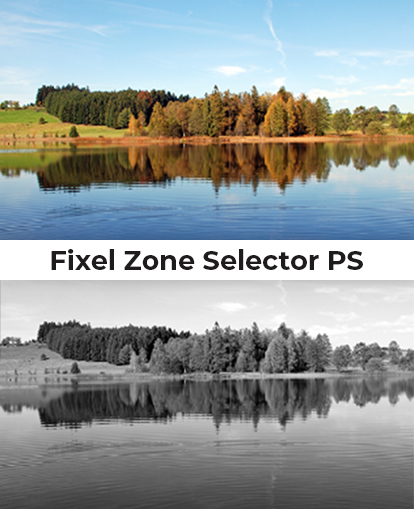
A luminosity mask generator begins with a Grayscale image and then processes it with a specific number of input pixels balanced against a specific number of output pixels.
The formula for determining the correct numbers of input and output pixels is complicated. Basically, a higher number of input and output pixels results in Highlights, while lower numbers result in Shadows.
In Photoshop, this can be done using either the Curves Tool or the Calculations Tool. But because of the sheer number of precise mathematical calculations involved in this process, the result can end up compromising either speed or quality, or both.[/vc_column_text][/vc_column][vc_column width=”1/2″][vc_single_image image=”503173″ alignment=”center”][/vc_column][/vc_row][vc_row font_color=”#000000″ css=”.vc_custom_1529474840421{padding-top: 5% !important;padding-right: 5% !important;padding-left: 5% !important;background-color: #eaeaea !important;}”][vc_column][vc_column_text]
Luminosity Masks Made Easy With Zone Selector PS Plugin!
[/vc_column_text][/vc_column][/vc_row][vc_row font_color=”#000000″ css=”.vc_custom_1529474849666{padding-top: 3% !important;padding-right: 10% !important;padding-left: 10% !important;background-color: #eaeaea !important;}”][vc_column][vc_column_text]The Zone Selector PS makes the process of mask building user-friendly and precise.
It’s based on Ansel Adams’ concept of dividing the tonal range into 11 zones, from 0 to X. You can create specific Luminosity Masks simply by combining desired zones. This gives you complete control over the masks you create.
To give you even more control, Zone Selector PS core internally uses Floating Point (32bit) high precision. It also works seamlessly on 8bit, 16bit, and 32bit (HDR) files.
Even better, Zone Selector PS is perfectly suited to automation! Like all of Fixel Algorithms’ engines, it can be recorded in Actions and is entirely scriptable. So you can personalize the tool to your needs and create the same masks over and over again.
And it’s so easy to use! All you have to do is select the zones you want from the Zone Selector PS panel, adjust the amount of feathering, and click OK.[/vc_column_text][/vc_column][/vc_row][vc_row font_color=”#000000″ css=”.vc_custom_1529499364712{padding-top: 5% !important;padding-right: 5% !important;padding-left: 5% !important;background-color: #eaeaea !important;}”][vc_column][vc_column_text]
For example edit & enhance the Shadows / Midtones / Highlights or any combination of your photos…
[/vc_column_text][/vc_column][/vc_row][vc_row font_color=”#000000″ css=”.vc_custom_1529474866280{padding-top: 3% !important;padding-right: 5% !important;padding-bottom: 3% !important;padding-left: 5% !important;background-color: #eaeaea !important;}”][vc_column width=”1/2″][vc_single_image image=”503183″ alignment=”center”][/vc_column][vc_column width=”1/2″][vc_single_image image=”503184″ alignment=”center”][/vc_column][/vc_row][vc_row font_color=”#000000″ css=”.vc_custom_1529499386518{padding-top: 3% !important;padding-right: 5% !important;padding-bottom: 3% !important;padding-left: 5% !important;background-color: #eaeaea !important;}”][vc_column width=”1/2″][vc_single_image image=”503185″ alignment=”center”][/vc_column][vc_column width=”1/2″][vc_single_image image=”503186″ alignment=”center”][/vc_column][/vc_row][vc_row font_color=”#000000″ css=”.vc_custom_1529470717375{padding-top: 5% !important;padding-right: 5% !important;padding-left: 5% !important;}”][vc_column][vc_column_text]
Watch the Fixel Zone Selector in action
[/vc_column_text][/vc_column][/vc_row][vc_row font_color=”#000000″ css=”.vc_custom_1529474965297{padding-top: 3% !important;padding-right: 10% !important;padding-bottom: 3% !important;padding-left: 10% !important;}”][vc_column][vc_video link=”https://www.youtube.com/watch?v=dLJD5Md5FQU” align=”center”][/vc_column][/vc_row][vc_row font_color=”#000000″ css=”.vc_custom_1529474877966{padding-top: 5% !important;padding-right: 5% !important;padding-left: 5% !important;background-color: #eaeaea !important;}”][vc_column][vc_column_text]
Easily generates professional level luminosity masks…
[/vc_column_text][/vc_column][/vc_row][vc_row font_color=”#000000″ css=”.vc_custom_1529474888145{padding-top: 3% !important;padding-right: 3% !important;background-color: #eaeaea !important;}”][vc_column width=”1/2″][vc_single_image image=”503181″ alignment=”center”][/vc_column][vc_column width=”1/2″][vc_column_text css=”.vc_custom_1529475829368{padding-top: 8% !important;padding-left: 3% !important;}”]The purchase of the Zone Selector PS will transform your work. You will immediately be able to create any kind of Luminosity Mask you desire, quickly and easily. The tonal range available to you far exceeds anything you can access through PhotoShop alone.
For just $15, you can purchase a multi-platform license which gives you access to this incredible and versatile tool. Included in the purchase is a PDF Quickstart Manual, allowing you to install and begin using Zone Selector PS immediately and with ease.
This original 11-zone system is not available through any other product. It will allow you to create stunning and unique results that you could never have imagined before. You will rapidly become an acknowledged master of the visual drama of shadows and highlights.
It’s also wonderfully compatible with PhotoShop CS6-CC2018, and with Mac and Windows machines.[/vc_column_text][/vc_column][/vc_row][vc_row font_color=”#000000″ css=”.vc_custom_1529474310155{padding-top: 5% !important;padding-right: 5% !important;padding-left: 5% !important;}”][vc_column][vc_column_text]
A Luminosity Mask Generator Like No Other
The Zone Selector PS includes all the following great features.
[/vc_column_text][/vc_column][/vc_row][vc_row font_color=”#000000″ css=”.vc_custom_1529474949508{padding-top: 3% !important;padding-bottom: 3% !important;padding-left: 15% !important;}”][vc_column][vc_column_text]
- 11 different Tonal Zones, to completely control the tonal range of the Luminosity Mask
- Easy and intuitive UI
- Can be recorded in Actions
- Easily scriptable
- Comp/Mask function that toggles between viewing the mask or the composition of the layer
- Ability to control the Feathering level
- Multi CPU accelerated
- Compatible with CPUs with SSE4 and up
- Detailizer benefits, due to an innovative algorithm
- Adobe Photoshop CS6 & CC compatible
- Modern CPU optimized code
- 32 Bit color depth internal processing
- 64 bit compatible
- Compatible with Mac and Windows
- Ability to easily create a variety of Shadows, Highlights, and Midtone Luminosity Masks
- A quickstart PDF Manual with installation instructions
[/vc_column_text][/vc_column][/vc_row][vc_row font_color=”#000000″ css=”.vc_custom_1529474900675{padding-top: 5% !important;padding-right: 5% !important;padding-left: 5% !important;background-color: #eaeaea !important;}”][vc_column][vc_column_text]
Start Using The Zone Selector PS Today For Luminosity Masks That Far Exceed The Ordinary…
**Limited Time Offer **
[/vc_column_text]
[/vc_column][/vc_row]

Reviews
There are no reviews yet.