







[vc_row font_color=”#000000″ css=”.vc_custom_1525931535293{padding-top: 18% !important;padding-bottom: 18% !important;background-image: url(https://abz.photowhoa.com/wp-content/uploads/2018/05/Bundle-of-YouTube-Courses-That’ll-Help-You-Become-the-Next-Viral-Sensation-1.png?id=498229) !important;background-position: center !important;background-repeat: no-repeat !important;background-size: cover !important;}”][vc_column][vc_column_text]
Create Professional Edits With Just One Click!
[/vc_column_text][/vc_column][/vc_row][vc_row font_color=”#000000″ css=”.vc_custom_1525926149560{padding-top: 5% !important;padding-left: 3% !important;background-color: #000000 !important;}”][vc_column width=”1/2″][vc_column_text css=”.vc_custom_1525926177244{padding-top: 5% !important;padding-right: 3% !important;}”]
Retouching skin can be one of the most difficult parts of photo editing.
When you get it right, you can turn an ordinary photo into a gorgeous, professional-looking portrait that the subject is proud to hang in their home.
However, when you get it wrong, you can make skin tones look unnatural and odd.
Retouching skin in photos is all about removing blemishes and imperfections and enhancing the skin in a seamless, realistic way. If you can tell that a photo has been retouched, the technique needs work – retouched photos should look realistic and natural. They should simply look like a more perfect version of reality.
However, it’s not that easy. Photoshop is complicated and there are many tiny steps that go into retouching a photo successfully. It can take a long time to learn all of these steps…[/vc_column_text][/vc_column][vc_column width=”1/2″][vc_single_image image=”498209″ alignment=”center”][/vc_column][/vc_row][vc_row font_color=”#000000″ css=”.vc_custom_1525926191678{padding-top: 3% !important;padding-right: 3% !important;background-color: #000000 !important;}”][vc_column width=”1/2″][vc_single_image image=”498210″ alignment=”center”][/vc_column][vc_column width=”1/2″][vc_column_text css=”.vc_custom_1525930902172{padding-top: 12% !important;padding-left: 3% !important;}”]
OR you can simply use premade Photoshop skin retouching brushes & actions!
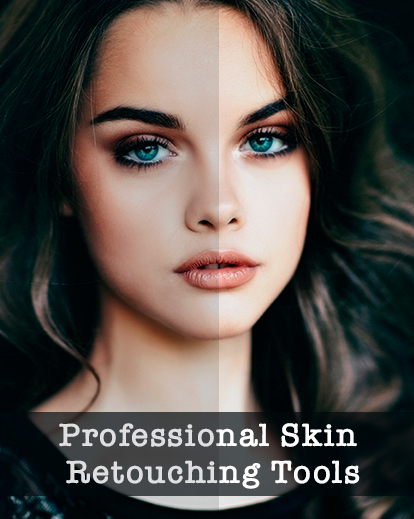
Professional Skin Retouching Tools allow you to create clean and professional edits with just one click. You’ll be able to give your photos a level of high-quality polish without having to learn countless photo editing techniques.
This collection of skin retouching tools will make it easier than ever to edit your photos to a professional-looking standard. You’ll save a ton of time and you’ll have the techniques of photo editing experts – right at your fingertips.[/vc_column_text][/vc_column][/vc_row][vc_row font_color=”#000000″ css=”.vc_custom_1525921667085{padding-top: 5% !important;padding-right: 10% !important;padding-left: 10% !important;}”][vc_column][vc_column_text]
What can you do with these Photoshop skin retouching brushes & actions?
This package of professional skin retouching actions will allow you to transform your portraits in a number of ways, including:[/vc_column_text][/vc_column][/vc_row][vc_row font_color=”#000000″ css=”.vc_custom_1525921802929{padding-top: 3% !important;padding-left: 20% !important;}”][vc_column width=”1/2″][vc_column_text]
- Fix colors
- Soften skin tone
- Sharpen details
- Remove blemishes
- Reduce redness
- Whiten eyes
- Reduce dark circles
- Airbrush skin
- Whiten teeth
[/vc_column_text][/vc_column][vc_column width=”1/2″][vc_column_text]
- Heal skin
- Enhance eyebrows
- Create a matte appearance
- Adjust skin warmth
- Adjust skin brightness
- Increase brightness in the eyes
- Highlight and contour
- Add skin texture
- And so much more!
[/vc_column_text][/vc_column][/vc_row][vc_row font_color=”#000000″ css=”.vc_custom_1525926552871{padding-top: 3% !important;padding-right: 10% !important;padding-bottom: 3% !important;padding-left: 10% !important;}”][vc_column][vc_column_text]This special package from Eldamar Studio comes with more than 80 different professional Skin Retouching Brushes. These brushes will allow you to edit specific areas of your photos with precision so that you can get the details just right.
The package also includes 50 Photoshop retouching actions. No matter what your photo requires, one of these actions will be perfect and will create a beautiful finished product. The tools in this package can be used in a range of different ways and they offer a wide selection of options for your photo retouching.[/vc_column_text][/vc_column][/vc_row][vc_row font_color=”#000000″ css=”.vc_custom_1525926465943{padding-top: 5% !important;padding-right: 10% !important;padding-left: 10% !important;background-color: #000000 !important;}”][vc_column][vc_column_text]
Let’s take a look at some before & after images
[/vc_column_text][/vc_column][/vc_row][vc_row font_color=”#000000″ css=”.vc_custom_1525926487469{padding-top: 3% !important;padding-right: 3% !important;padding-left: 3% !important;background-color: #000000 !important;}”][vc_column width=”1/2″][vc_single_image image=”498213″ alignment=”center”][/vc_column][vc_column width=”1/2″][vc_single_image image=”498214″ alignment=”center”][/vc_column][/vc_row][vc_row font_color=”#000000″ css=”.vc_custom_1525926497806{padding-top: 3% !important;padding-right: 3% !important;padding-left: 3% !important;background-color: #000000 !important;}”][vc_column width=”1/2″][vc_single_image image=”498216″ alignment=”center”][/vc_column][vc_column width=”1/2″][vc_single_image image=”498217″ alignment=”center”][/vc_column][/vc_row][vc_row font_color=”#000000″ css=”.vc_custom_1525926506304{padding-top: 3% !important;padding-right: 3% !important;padding-left: 3% !important;background-color: #000000 !important;}”][vc_column width=”1/2″][vc_single_image image=”498232″ alignment=”center”][/vc_column][vc_column width=”1/2″][vc_single_image image=”498220″ alignment=”center”][/vc_column][/vc_row][vc_row font_color=”#000000″ css=”.vc_custom_1525926523304{padding-top: 3% !important;padding-right: 3% !important;padding-bottom: 3% !important;padding-left: 3% !important;background-color: #000000 !important;}”][vc_column width=”1/2″][vc_single_image image=”498221″ alignment=”center”][/vc_column][vc_column width=”1/2″][vc_single_image image=”498222″ alignment=”center”][/vc_column][/vc_row][vc_row font_color=”#000000″ css=”.vc_custom_1525924333210{padding-top: 5% !important;padding-right: 10% !important;padding-left: 10% !important;}”][vc_column][vc_column_text]
Advantages of these Photoshop skin retouching brushes & actions…
[/vc_column_text][/vc_column][/vc_row][vc_row font_color=”#000000″ css=”.vc_custom_1525925527823{padding-top: 3% !important;padding-left: 3% !important;}”][vc_column width=”1/2″][vc_column_text css=”.vc_custom_1525926029821{padding-top: 6% !important;padding-right: 3% !important;}”]When you download this bundle of professional Photoshop skin retouching actions and brushes, here are some of the benefits:
- You won’t have to learn complex photo editing techniques on Photoshop – you’ll get the same results with one click.
- You will save a lot of time editing your photos, which means that you will be able to get this task done more quickly and have time for other things.
- The skin retouching brushes allow you to pinpoint certain areas of the skin to touch up, without having to alter the rest of the image.
- The retouching actions and brushes are incredibly easy to use, so you don’t have to have advanced Photoshop training.
- These Photoshop actions are designed to look great on a wide variety of images.
- The package is compatible with both Mac and PC and the actions can be used on both JPG and RAW images.
- When you use these actions, you can also edit the opacity in order to change the strength of the effect – essentially creating an infinite amount of looks that can be created with this one package.
This package is a powerful addition to the toolbox of a professional photographer, or someone who simply takes portraits as a hobby. These actions will save you time and allow you to create consistent results in the images you edit for your clients. [/vc_column_text][/vc_column][vc_column width=”1/2″][vc_single_image image=”498225″ alignment=”center”][/vc_column][/vc_row][vc_row font_color=”#000000″ css=”.vc_custom_1525926707199{padding-top: 5% !important;padding-right: 5% !important;padding-left: 5% !important;background-color: #f2f2f2 !important;}”][vc_column][vc_column_text]
Download It Today & Get Started On Creating Your Most Beautiful Portraits Yet!
[/vc_column_text][/vc_column][/vc_row]

Fosari –
Looks very good. Did not have enough time to try all of it, but definitively will:-)
soumaya schnur –
Fantastic product, saving me a lot of time and giving me great results.
Thank you!
Dean Huschle –
Excellent product. For fast portrait editing, it is quick and easy!
MaryAnnB –
So glad I purchased it.
M.Nelson –
Top actions and brushes, you need to try it for yourself and grin with the results.
Szymon –
I’m very happy
Michael Kreck –
Great addition to my photography “toolbox.”
null –
This is a great program it really shortens your work load. Would highly recommend product
Mike –
Easy to use, fixes many problems
Jan Christiansen –
Great!