Declutter Your Workspace & Retouch With Industry-Tested Tools
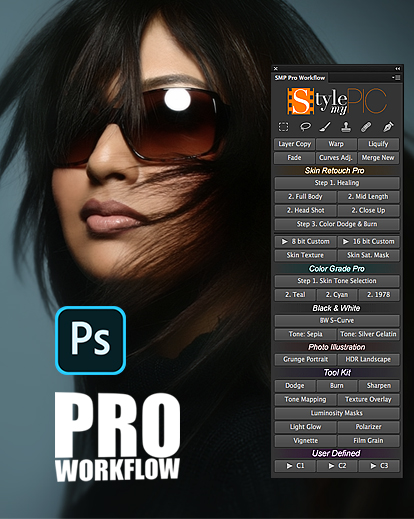
Want to make Photoshop skin retouching faster? What if you had all your most-used tools accessible in one panel? Then, on top of that, we had a selection of actions that intelligently improve the colour and look of skin, eyes, and hair — while still having Photoshop’s power at your side.
Would that help? Pro Workflow does that. At its core, it’s a Photoshop extension panel that uses frequently used retouching techniques—liquify, curves adjustment layer, layer copy, and others—together with actions and tools to speed up how you retouch your portraits.
So, instead of digging through menus and memorizing new keyboard shortcuts to trigger some effect repeatedly, you must click a button and apply any of the 20+ actions to find yourself with a nearly fully retouched photo quickly.
Photoshop Skin Retouching Pro, Color Grade Pro, Black & White, Photo Illustration, and Tool Kit all come with actions and tools specifically designed for every component of a successful retouch. You’re getting over 20 actions and tools, all sleekly packed in one Style My Pic Pro workflow panel.
What’s included? How does the Photoshop Extension Panel work?
Push Your Creativity To New Heights
Style My Pic Pro workflow panel provides a sleeker, more user-friendly Photoshop retouching interface.
This Photoshop retouching panel includes actions and tools designed to help you power through photo editing.
Once installed, you’ll have a Photoshop panel that bundles all the actions and tools with several Photoshop shortcuts.
Each action has been designed for extensive portrait and beauty retouching and is fully customizable and adjustable.
Highlights Of Style My Pic Pro Workflow Panel
Photoshop Skin Retouching Pro: 8 predefined retouching tools, including Skin Texture (which adds texture) and Skin Saturation Mask (which evens out overly saturated areas)
Colour Retouch Pro: A two-step process to fine-tuning and enhancing your photo’s colour grade; comes with three pre-installed colour options (you can also adjust the program’s colour tones yourself)
Black & White: A monochrome conversion and two classic tones (Silver Gelatin and Sepia) to choose from
Photo Illustration: Two actions — Grunge Effect and HDR Landscape — to use for your portraits and landscapes
Toolkit: Suite of photo-editing tools, including custom-designed dodge, burn, sharpen, and six unique luminosity masks.
More Info: Learn more about SMP Pro Workflow here (it has much more info about the Photoshop program)
Recently purchased your 2500 overlay bundle.
Very impressive variety of overlay to work with !!
Love the fog and smoke overlays !!
Looking forward to trying them all !
Rated 5 out of 5
Nizam Mohamed –
This review is not for THIS particular set of of actions, but a couple years ago I purchased a set of actions from SMP. (I have been telling everyone I meet about it, so this is my chance to publicize it). I have been a professional photographer for 36 years, have been lucky to get my Masters, won several Kodak Awards of Excellence and Fuji Film Masterpiece Awards and several Photographer-of-the-Year Awards, so I will like to think that I know what I am talking about. This is a set of about 21 actions WHICH I USE EVERY SINGLE DAY. It contains “fill-light” for those dark areas, highlight recovery for those light areas, shadow details for those black and dark areas which one can use to not just lighten, but to show “details” in the darker areas. It also has highlight details which one can use with or without highlight recovery. Besides shooting in RAW, I feel like I can “fix” almost any photo over or underexposed. Even the best photographer shooting “on the run” like at weddings have a few misses because it is not a controlled situation like in a studio shoot. I used to do the “fixes” the hard way by selection the areas and lighting or darkening them as needed. These SMP actions are the answer to my prayers and was the best $19.00 I ever spent on actions. I am not affiliated with SMP in any way.
Rated 4 out of 5
crypto –
It is my go-to add-on for shortcuts. Would like to be able to rename C1, C2, C3, though.











[email protected] –
after buying this product I needed support. Support was given quickly and efficiently. I can only strongly recommend Photowhoa. Jürgen
[email protected] –
Recently purchased your 2500 overlay bundle.
Very impressive variety of overlay to work with !!
Love the fog and smoke overlays !!
Looking forward to trying them all !
Nizam Mohamed –
This review is not for THIS particular set of of actions, but a couple years ago I purchased a set of actions from SMP. (I have been telling everyone I meet about it, so this is my chance to publicize it). I have been a professional photographer for 36 years, have been lucky to get my Masters, won several Kodak Awards of Excellence and Fuji Film Masterpiece Awards and several Photographer-of-the-Year Awards, so I will like to think that I know what I am talking about. This is a set of about 21 actions WHICH I USE EVERY SINGLE DAY. It contains “fill-light” for those dark areas, highlight recovery for those light areas, shadow details for those black and dark areas which one can use to not just lighten, but to show “details” in the darker areas. It also has highlight details which one can use with or without highlight recovery. Besides shooting in RAW, I feel like I can “fix” almost any photo over or underexposed. Even the best photographer shooting “on the run” like at weddings have a few misses because it is not a controlled situation like in a studio shoot. I used to do the “fixes” the hard way by selection the areas and lighting or darkening them as needed. These SMP actions are the answer to my prayers and was the best $19.00 I ever spent on actions. I am not affiliated with SMP in any way.
crypto –
It is my go-to add-on for shortcuts. Would like to be able to rename C1, C2, C3, though.
Jacque –
this looks like a pretty nice extension