







[vc_row font_color=”#000000″ css=”.vc_custom_1549004976630{padding-top: 3% !important;padding-right: 5% !important;padding-bottom: 3% !important;padding-left: 8% !important;background-color: #000000 !important;}”][vc_column][vc_column_text]What do you look for in professional Photoshop plugins?
The answer is simple: the ability to easily master all that Photoshop has to offer.
And that’s a lot. This platform has almost unlimited capability to transform any photo into a masterpiece.
The magic of contrast, detail, luminosity masks and edges that are strategically sharpened or blurred is right there at your fingertips.
But not all professional Photoshop plugins are the same.
Some are unwieldy to use, possibly incompatible with your equipment or software. Others are too pricey for your budget. And still others just don’t dazzle with the results that you expected.
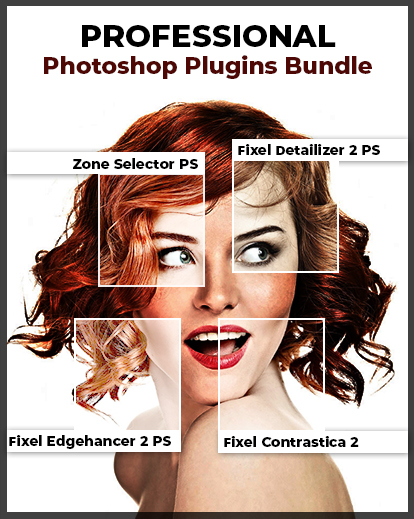
But PhotoWhoa has the solution. We’ve put together four of the best professional Photoshop plugins by Fixel Algorithms out there in one convenient and affordable bundle.
These plugins are user-friendly, effective and just plain fun.
So let’s dig in and find out what these great Photoshop plugins can do for you.[/vc_column_text][/vc_column][/vc_row][vc_row font_color=”#000000″ css=”.vc_custom_1549005007550{padding-top: 3% !important;padding-right: 5% !important;padding-bottom: 3% !important;padding-left: 5% !important;background-color: #ffffff !important;}”][vc_column][vc_column_text]
Fixel Contrastica 2
[/vc_column_text][/vc_column][/vc_row][vc_row font_color=”#000000″ css=”.vc_custom_1549005024988{padding-right: 3% !important;padding-bottom: 2% !important;padding-left: 3% !important;background-color: #ffffff !important;}”][vc_column width=”1/2″][vc_column_text]If you want flawless control over the contrast in your photos, this plugin will quickly become your go-to. Here’s why.
Features –
- The ability to target Global and Local contrast at the same time
- Priority to Shadows, Midtone or Highlights
- The use of Floating Point high precision
- Works on 32bit,16bit, and 8bit HDR files
- Automation-ready: actions can be recorded and are 100% scriptable
- Works on PhotoShop CS6-CC2019
- Compatible with both Mac and Windows
Whether you want a subtle contrast or to make some vivid colors pop, you’ll love what you can do with this plugin.
It’s delightfully easy to use, and you’ll be thrilled with the intense contrast that you’re able to achieve.
Best of all, if you find an action you like, you can record it and use it over and over again…saving hours of your precious time. More details
[/vc_column_text][/vc_column][vc_column width=”1/2″][vc_single_image image=”543821″][/vc_column][/vc_row][vc_row font_color=”#000000″ css=”.vc_custom_1549005280164{background-color: #ffffff !important;}”][vc_column][vc_column_text]
Before / After Images
[/vc_column_text][/vc_column][/vc_row][vc_row font_color=”#000000″ css=”.vc_custom_1548998477732{padding-top: 2% !important;padding-right: 3% !important;padding-bottom: 2% !important;padding-left: 3% !important;}”][vc_column width=”1/2″][vc_single_image image=”543848″ alignment=”center” css=”.vc_custom_1585741868866{padding-top: 1% !important;padding-right: 1% !important;padding-bottom: 1% !important;padding-left: 1% !important;}”][/vc_column][vc_column width=”1/2″][vc_single_image image=”543840″ alignment=”center” css=”.vc_custom_1585741942919{padding-top: 1% !important;padding-right: 1% !important;padding-bottom: 1% !important;padding-left: 1% !important;}”][/vc_column][/vc_row][vc_row font_color=”#000000″ css=”.vc_custom_1549005073604{padding-top: 3% !important;padding-right: 5% !important;padding-bottom: 3% !important;padding-left: 5% !important;background-color: #e2e2e2 !important;}”][vc_column][vc_column_text]
Fixel Detailizer 2 PS
This unique detail booster plugin uses a system of decomposing an image into five detail ranges, letting you choose which ones you want to boost.
[/vc_column_text][/vc_column][/vc_row][vc_row font_color=”#000000″ css=”.vc_custom_1549005090167{padding-top: 3% !important;padding-right: 3% !important;padding-bottom: 3% !important;padding-left: 3% !important;background-color: #e2e2e2 !important;}”][vc_column width=”1/2″][vc_single_image image=”543829″ alignment=”center”][/vc_column][vc_column width=”1/2″][vc_column_text]Features –
- Decomposition of the image into five different ranges, each of which can be boosted independently
- A unique Wavelets algorithm for powerful scales decomposition
- The use of 32bit Floating Point high precision
- Seamless functionality with various sizes of HDR files
- The ability to be recorded and scripted as Actions to be used in automation
- Compatible with Photoshop CS6-CC2019
- Compatible with Mac and Windows
This plugin allows you to carefully calibrate the intensity of any image, giving you complete control of every detail. Users consistently find it more powerful and effective than other traditional methods, such as highpass filters. As with any Fixel product, this comes with reliable and friendly customer support to troubleshoot any problems that might arise. More details[/vc_column_text][/vc_column][/vc_row][vc_row font_color=”#000000″ css=”.vc_custom_1549005108118{background-color: #e2e2e2 !important;}”][vc_column][vc_column_text]
Before / After Images
[/vc_column_text][/vc_column][/vc_row][vc_row font_color=”#000000″ css=”.vc_custom_1549005386015{padding-right: 3% !important;padding-bottom: 3% !important;padding-left: 3% !important;background-color: #e2e2e2 !important;}”][vc_column width=”1/2″][vc_single_image image=”543835″ alignment=”center” css=”.vc_custom_1585742099841{padding-top: 1% !important;padding-right: 1% !important;padding-bottom: 1% !important;padding-left: 1% !important;}”][/vc_column][vc_column width=”1/2″][vc_single_image image=”543834″ alignment=”center” css=”.vc_custom_1585742150819{padding-top: 1% !important;padding-right: 1% !important;padding-bottom: 1% !important;padding-left: 1% !important;}”][/vc_column][/vc_row][vc_row font_color=”#000000″ css=”.vc_custom_1549005308853{padding-top: 3% !important;padding-right: 5% !important;padding-bottom: 2% !important;padding-left: 8% !important;}”][vc_column][vc_column_text]
Fixel EdgeHancer 2
Do you want to do something incredible with the edges in your images? Perhaps sharpen or artistically blur them?
Fixel EdgeHancer 2 makes it possible for you to do so flawlessly. It will soon become an effortless part of your workflow.
[/vc_column_text][/vc_column][/vc_row][vc_row font_color=”#000000″ css=”.vc_custom_1549005337608{padding-right: 3% !important;padding-bottom: 3% !important;padding-left: 3% !important;}”][vc_column width=”1/2″][vc_column_text]Features –
- Emphasizes edges without altering surrounding pixels
- Uses Floating Point high precision (32bit)
- Also works on 8bit, 16bit and 32bit HDR files
- Can be recorded as Actions and scripted
- Comes with PDF manual for easy installation
- Compatible with Photoshop CS6-CC2019
- Compatible with Mac and Windows machines
Like the other products mentioned here, the EdgeHancer gives you effortless control of your results. You can sharpen edges without any grain, halos, or other undesired effects. It allows you to select an area and modify the intensity with perfect precision. More details[/vc_column_text][/vc_column][vc_column width=”1/2″][vc_single_image image=”543846″ alignment=”center”][/vc_column][/vc_row][vc_row][vc_column][vc_column_text]
Before / After Images
[/vc_column_text][/vc_column][/vc_row][vc_row font_color=”#000000″ css=”.vc_custom_1549003900410{padding-right: 3% !important;padding-bottom: 3% !important;padding-left: 3% !important;}”][vc_column width=”1/2″][vc_single_image image=”458129″ alignment=”center” css=”.vc_custom_1585742237752{padding-top: 1% !important;padding-right: 1% !important;padding-bottom: 1% !important;padding-left: 1% !important;}”][/vc_column][vc_column width=”1/2″][vc_single_image image=”458133″ alignment=”center” css=”.vc_custom_1585742267408{padding-top: 1% !important;padding-right: 1% !important;padding-bottom: 1% !important;padding-left: 1% !important;}”][/vc_column][/vc_row][vc_row font_color=”#000000″ css=”.vc_custom_1549005416778{padding-top: 3% !important;padding-right: 5% !important;padding-bottom: 2% !important;padding-left: 8% !important;background-color: #e2e2e2 !important;}”][vc_column][vc_column_text]
Fixel Zone Selector PS
Ever since Ansel Adams discovered original ways to channel luminosity, we’ve been obsessed with luminosity masks. And Zone Selector PS makes this innovative technique accessible to anyone.
[/vc_column_text][/vc_column][/vc_row][vc_row font_color=”#000000″ css=”.vc_custom_1549005432538{background-color: #e2e2e2 !important;}”][vc_column width=”1/2″][vc_single_image image=”543850″ alignment=”center”][/vc_column][vc_column width=”1/2″][vc_column_text]Features –
- Divides tonal range into eleven zones for the creation of specific Luminosity Masks
- Uses Floating Point high precision
- Also works on 8bit, 16bit and 32bit HDR files
- Scriptable and can easily be recorded as Actions for automation needs
- PDF manual guides you in the installation process
- Compatible with Photoshop CS6-CC2019
- Compatible with Mac and Windows machines
A handy toolbar allows you to “feather” your luminosity masks as much as necessary to create the exact effect that you’re looking for.
If you’ve always wanted to try the dramatic interplay of light and shadow that can be achieved with Luminosity Masks, this is the perfect opportunity. More details[/vc_column_text][/vc_column][/vc_row][vc_row font_color=”#000000″ css=”.vc_custom_1549005447831{padding-top: 3% !important;background-color: #e2e2e2 !important;}”][vc_column][vc_column_text]
Before / After Images
[/vc_column_text][/vc_column][/vc_row][vc_row font_color=”#000000″ css=”.vc_custom_1549005463476{padding-bottom: 3% !important;background-color: #e2e2e2 !important;}”][vc_column width=”1/3″][vc_single_image image=”543852″ alignment=”center”][/vc_column][vc_column width=”1/3″][vc_single_image image=”543851″ alignment=”center”][/vc_column][vc_column width=”1/3″][vc_single_image image=”543853″ alignment=”center”][/vc_column][/vc_row][vc_row font_color=”#000000″ css=”.vc_custom_1551159364737{padding-top: 3% !important;padding-right: 5% !important;padding-bottom: 3% !important;padding-left: 15% !important;}”][vc_column][vc_column_text]
System Requirements
- CPU
- Intel – Any Core Family CPU.
- AMD – Ryzen and above.
- Operating System
- Windows – Windows 7 64 Bit / Windows 8 64 Bit / Windows 10 64 Bit.
- macOS – macOS 10.7 and above.
- Photoshop – CS6 and above (64 Bit Version Only).
[/vc_column_text][/vc_column][/vc_row][vc_row font_color=”#000000″ css=”.vc_custom_1549004440793{padding-top: 3% !important;padding-right: 5% !important;padding-bottom: 3% !important;padding-left: 8% !important;}”][vc_column][vc_column_text]
The Best Professional Photoshop Plugins For the Lowest Price
We have curated this bundle of the four most powerful professional Photoshop plugins available on the market in this convenient bundle.
At one low price, you can now easily access everything you’ve always wanted to achieve with Photoshop.
So grab this professional Photoshop plugin bundle today. Your work will never be the same.[/vc_column_text][/vc_column][/vc_row][vc_row font_color=”#000000″ css=”.vc_custom_1549004670448{padding-top: 2% !important;padding-right: 5% !important;padding-bottom: 3% !important;padding-left: 8% !important;}”][vc_column][vc_column_text]
Get This Bundle At 60% Off & Achieve Amazing Results With Your Photos
Download Today
[/vc_column_text][/vc_column][/vc_row]

Reviews
There are no reviews yet.