







[vc_row font_color=”#ffffff” css=”.vc_custom_1483940057747{padding-top: 10% !important;padding-right: 10% !important;padding-bottom: 10% !important;padding-left: 10% !important;background-color: #000000 !important;background-position: center !important;background-repeat: no-repeat !important;background-size: cover !important;}” background_style=”parallax”][vc_column font_color=”#ffffff” css=”.vc_custom_1414497512096{padding-right: 0px !important;padding-left: 0px !important;}”][vc_row_inner][vc_column_inner][vc_column_text css=”.vc_custom_1483940026272{margin-bottom: 0px !important;}”]
3 BESTSELLING RETOUCHING TECHNIQUES FROM THE PAST YEAR ALL IN ONE BUNDLE
[/vc_column_text][/vc_column_inner][/vc_row_inner][/vc_column][/vc_row][vc_row font_color=”#000000″ css=”.vc_custom_1483943008120{padding-top: 4% !important;padding-bottom: 4% !important;}”][vc_column][vc_single_image image=”390239″ alignment=”center”][vc_column_text css=”.vc_custom_1483941454733{padding-top: 6% !important;padding-right: 12% !important;padding-bottom: 6% !important;padding-left: 12% !important;}”]You can ruin a good photo with a bad edit. You can also push Photoshop so far that your photograph becomes less you and more it. While that’s cool, some photographers rather stay true to life—if that’s what you’re about, then you found yourself a perfect bundle.
It has 31 lessons, 6+ hours, and 3 courses. And it’s taught by one of our best friends, Manni from RetutPro. He’s always making tutorials that we enjoy and we decided to put together three of his bestsellers in one bundle for you.
So what will you learn? Basically, you’ll learn how to Photoshop without overdoing, or overcorrecting, your photos. That means you’ll learn how to composite, color grade, and retouch in a way that finalizes—and not obscures—your photographic skills.
You’ll see Manni breakdown his retouching techniques so that you understand them intuitively. You’ll get ideas on how to retouch skin, remove boring backgrounds, and fix over- and under-exposed areas that have always bugged you. 6 total hours of education. Yeah, it’s a lot for a little.
BONUS: You’ll also get 120 high-quality, ultra-useful, 4032 x 6048 Photoshop textures for free. 120 of them to stylize your portraiture, product photography, or any photo you find fit.[/vc_column_text][vc_single_image image=”390243″ alignment=”center”][/vc_column][/vc_row][vc_row font_color=”#000000″ css=”.vc_custom_1483943571087{padding-bottom: 4% !important;background-color: #eaeaea !important;}”][vc_column][vc_custom_heading text=” What will I get? Why should I buy it?” font_container=”tag:h2|text_align:center” use_theme_fonts=”yes” css=”.vc_custom_1483941854432{padding-top: 8% !important;padding-right: 10% !important;padding-bottom: 2% !important;padding-left: 10% !important;}”][vc_column_text css=”.vc_custom_1483943093544{padding-top: 3% !important;padding-right: 12% !important;padding-bottom: 5% !important;padding-left: 12% !important;}”]You’re going to get 3 courses. Each course breaks down a unique retouching techniques of photographs related to 3 different shoots. In each course, you’ll see Manni go from explaining his lighting setups to finishing off the photo with Photoshop.
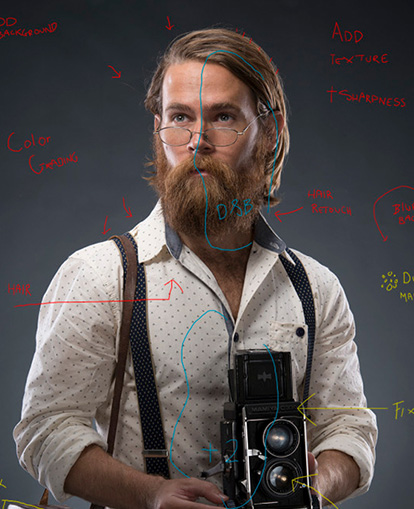
In The Photographer, you’ll learn many of Manni’s most productive retouch techniques for portraits. It runs for 2 hours, and you’ll see how Manni works with textures (like the bonus ones you’re getting), how he masks and merges subjects, and creates realistic-looking light.[/vc_column_text][vc_single_image image=”390240″ alignment=”center”][/vc_column][/vc_row][vc_row font_color=”#000000″ css=”.vc_custom_1474978332425{padding-top: 5% !important;padding-right: 12% !important;padding-left: 12% !important;}”][vc_column][vc_column_text]In The Instagrammer II, you’ll learn how to composite in a way that doesn’t looked forced or unnatural. You’ll see Manni build backgrounds and then blend them together. It runs for 3 hours, and you’ll also learn techniques on how to retouch skin, hair, and accessories in very unique and subtle way.[/vc_column_text][/vc_column][/vc_row][vc_row font_color=”#000000″ css=”.vc_custom_1475022177224{padding-top: 3% !important;padding-right: 10% !important;padding-bottom: 3% !important;padding-left: 10% !important;background-color: #0c0c0c !important;}”][vc_column][vc_video link=”https://www.youtube.com/watch?v=4-372Va6SwE”][/vc_column][/vc_row][vc_row font_color=”#000000″ css=”.vc_custom_1483944449672{padding-top: 3% !important;padding-right: 12% !important;padding-bottom: 3% !important;padding-left: 12% !important;}”][vc_column][vc_column_text]In The Zulu Warrior, you’ll learn how to retouch for dramatic looks. It’s over an hour long, and you’ll get some techniques on controlling light, sharpening selectively, and color grading to make your images pop.[/vc_column_text][/vc_column][/vc_row][vc_row font_color=”#000000″ css=”.vc_custom_1475022177224{padding-top: 3% !important;padding-right: 10% !important;padding-bottom: 3% !important;padding-left: 10% !important;background-color: #0c0c0c !important;}”][vc_column][vc_video link=”https://www.youtube.com/watch?v=PrBEcst1WGs”][/vc_column][/vc_row][vc_row font_color=”#ffffff” css=”.vc_custom_1475238551420{padding-bottom: 8% !important;background-color: #353535 !important;background-position: center !important;background-repeat: no-repeat !important;background-size: cover !important;}” background_style=”normal”][vc_column css=”.vc_custom_1440461247801{padding-top: 10% !important;}”][vc_column_text css=”.vc_custom_1483943356484{margin-bottom: 0px !important;padding-top: 1% !important;padding-right: 10% !important;padding-bottom: 5% !important;padding-left: 10% !important;}”]
Okay, what’s all included, again?
[/vc_column_text][vc_row_inner][vc_column_inner][vc_column_text css=”.vc_custom_1483943642951{padding-right: 25% !important;padding-left: 25% !important;}”]
- 3 courses on retouching techniques: The Photographer, The Instagrammer, and The Zulu Warrior for over 6+ hours of content
- 31 HD videos in total
- Lessons on retouching skin, hair, and backgrounds
- Lessons on compositing, color grading, and sharpening
- BONUS: 120 Photoshop textures to use when you need them
[/vc_column_text][/vc_column_inner][/vc_row_inner][/vc_column][/vc_row][vc_row font_color=”” css=”.vc_custom_1440465985813{padding-top: 10% !important;padding-bottom: 10% !important;background-color: #f7f7f9 !important;}”][vc_column][vc_column_text]
Learn how to Photoshop without overdoing, or
over correcting your photos.
[/vc_column_text][vc_column_text]
[/vc_column_text][/vc_column][/vc_row]

Reviews
There are no reviews yet.